Visit Oregon South Coast

Introduction to Pinball Repair
and Maintenance

Index:

A. Caution
B. Getting Started
    1) Solid State vs. Electro-mechanical
    2) Before Turning it on!
C. Routine Maintenance
    1) Supplies Needed
    2) Pinballs
D. The Playfield
    1) Cleaning
    2) Flippers
    3) Rubber Rings
    4) Playfield Switches
        a) Electro-mechanical switches
        b) Solid State Switches
E. Batteries
F. Light Bulbs
G. The Backglass
H. Lubrication
I.  It Does Not Work
    a) Fuses
    b) It still does not work
J. Contact Information / Feedback
K. External Links
    a) Additional Repair Information
    b) Parts
    c) Game Information
    d) Where to play pinball.
    e) Pinball Conventions.

by , 06/29/2010.
Copyright 2006 - 2010, all rights reserved.
I will answer all emails. Please insure that your email is valid and your SPAM filter will not block my reply.
If you do not get a reply, please try emailing me from another email address.
Please allow at least one week for replies.


This is an Introduction to pinball maintenance and simple repairs for new pinball machine owners. There are many simple repairs and checks that any pinball owner can do without any expertise. If you are a new owner or thinking about purchasing a pinball machine, then this site on pinball repair tips is for you.

Caution

Pinball machines contain potentially lethal voltage.  Dangerous voltage may remain for a period even after it is unplugged.  Prior to opening a pinball machine, be certain to unplug it, then turn it on to insure that it was actually unplugged.  It is recommended that the machine be allowed to sit several minutes to allow any remaining power to dissipate. Repair should be left to properly trained personnel. 

Solvents such as isopropyl alcohol are flammable and should be used only in a well ventilated area. Do not operate the pinball machine until the vapors have been removed.

Proceed at your own risk!

Getting Started

A glossary of pinball terms.     Opening the pinball machine.      Removing the pinballs.      Batteries.     Fuse locations.         Build a Rotisserie

Pinball machine can be divided into two general areas, the playfield and the backbox.  There are also two general categories of pinball machines, solid state (SS) and electro-mechanical (EM) machines.  SS machines have digital displays that power up when the machine is turned on.  EM machines use mechanical reels that spin to display the score.

Maintenance of SS and EM playfields are similar.  However, the similarity ends there.  EM machines use relays, motors and switches to run the game.  SS machines rely on electronic circuit boards (PCB) to control the game.

The first step is to identify your pinball machine type and model.  An excellent resource is the Internet Pinball Database.  Look up your pinball machine on this database to determine what type it is.  Find out the manufacturer and the type Solid State Electronic or Electro-mechanical and the year.  If your machine is solid state, also note the MPU type.  You can then use this information to identify the information you need to research at PinballHQ.com or other websites.

It is always helpful to have the operating and repair manuals.  For older machines, this may be a single manual.  For later machines, usually two or even three manuals may be needed.  These manuals can usually be purchased at Steve Young's The Pinball Resource,   Marco Specialties, or  Mayfair Amusements.  If your machine was manufactured by Stern, Sega or Data East, the manuals may be available from Stern Pinball, Inc.

Before Turning it On!

If you are buying a used game, the chances are pretty good that a wrong fuse was installed at some point. If it is large difference, then a problem could cause severe damage to your new pinball machine or even a fire. It is very important to check that the proper values are installed. For more information on locating the fuses, see "Fuse locations".

Routine Maintenance

Regular maintenance of a pinball machine can keep it running smoothly and maintain its resale value.  Prior to starting, see the Caution above.  The supplies suggested below are available from companies that supply pinball parts.

Supplies Needed

Most maintenance can be accomplished with supplies found in local stores.  Some materials may have to be ordered from pinball parts suppliers.  The following parts may be needed (will vary depending on the machine):

  • Q-tips.
  • Isopropyl alcohol (91%).  Do not use rubbing alcohol.
  • Screwdriver (Phillips and standard).
  • Needle-nose pliers.
  • Allen wrench set.
  • 400 grit sandpaper or flexstone (switch cleaning).
  • Nut driver set.
  • Multimeter (volt ohm meter).
  • Novus #2 or #3 cleaner
  • Treewax or Meguires Carnauba wax (or Optimum Car Wax®)
  • Light bulbs

Pinballs

The pinballs wear, get chipped and can contribute significantly to the playfield wear.  It is recommended that pinballs be replaced regularly.  New pinballs are inexpensive and can be obtained from the parts suppliers listed below.

The Playfield

The condition of the playfield can determine the resale value of a machine.  Additionally, dirt on the playfield can slow the play down. As an owner, a playfield is easy to maintain.

To access the playfield, you will have to open up the machine and remove the cover glass.

If you find it necessary to tilt up the playfield, it is recommended that you remove the pinball(s) first.  Otherwise, raising the playfield may eject the pinball, which could damage the playfield or backglass.  Removing the pinball can be simple on single ball machines or tricky on multiball games.  For single pinball games, you may be able to reach in and remove the ball, or manually press the solenoid ball eject mechanism.  For complex SS games, it may be easier to enter the service menu to eject the balls.  Consult the repair or operating manual for the specific procedure.

Cleaning

The first step is to clean the playfield.  Novus #1 and Novus #2 are recommended cleaners.  Follow the instructions on the containers. On clearcoated playfields, use this sparingly since these cleaners are mild abrasives and remove some of the coating.

Plastic ramps can be cleaned with Novus plastic polish.

The playfield should be waxed regularly. This will help prevent wear and make the game play faster.   Be certain to use real wax.  Treewax and Meguires Carnauba wax are among those recommended. Others recommend Optimum Car Wax® which is less abrasive.

Purchase a soft cloth like a microfiber towel to reduce surface scratches. A t-shirt works but can leave surface scratches that could be visible in a newer clearcoated playfield.

For a complete guide to playfield cleaning and restoration, see the links at the end of this page.

Flippers

Pinball flipper repair is not difficult. To start, check the flippers and other moving parts.  Manually move them and make certain that they do not contact the playfield.  If a flipper scrapes along the playfield, it will quickly wear through the surface, which will detract from its appearance and reduce the resale value.  The flippers should be held above the playfield by a bushing shown to the right (the flipper shaft is inserted through the hole in the bushing). This nylon bushing should protrude above the playfield and prevent the flipper from rubbing against the playfield. If the flipper was rubbing against the playfield, replace this bushing. It is available from the pinball parts suppliers listed below. Removal and replacement is easy for anyone who is handy with a screwdriver, socket wrench and / or allen wrench. After replacing the bushing, reassemble the flipper mechanism, then tighten the bolts while holding the flipper in the proper position.


Flipper rebuild kits from one of the pinball parts suppliers.

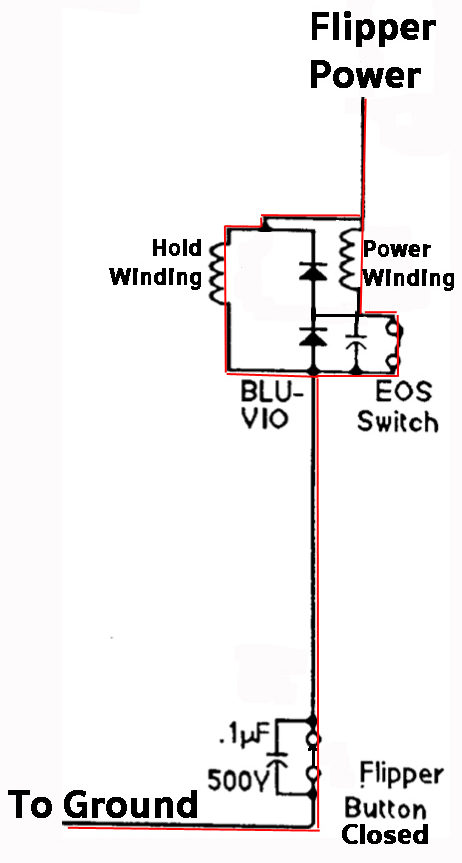
Flipper parts wear with age and the action of the flippers can become sluggish or start to stick. Sometimes it is possible to restore flipper action by disassembling the components, clean them (with isopropyl alcohol) and reassemble. However, it is usually a good idea to rebuild the flippers by ordering a rebuild kit from one of the pinball parts suppliers. These kits come with all the parts needed, with the possible exception of a bushing (shown above). For someone who is handy with a screwdriver, socket and allen wrench's, this is an easy job. A new end of stroke (EOS) switch will require the use of a soldering iron. Do not make the common mistake of trying to repair a sticky flipper by tightening the spring as that is addressing the symptom and not the problem. Never use any type of lubricants with the flippers.

While you are checking the flippers, be certain that the correct type of solenoid is installed. Unfortunately, some service personnel just throw in what they have handy. It is not unusual for a game to have a too weak solenoid installed, making difficult shots impossible, or too strong of a solenoid which can lead to broken parts. Consult the operating or service manual for the correct solenoid number.

Important note: Isopropyl alcohol and other solvents are flammable. Use in a well ventilated area. Do not operate the pinball machine until all vapors have disappeared.

The website, how flippers work, offers more information.

Rubber Rings

The rubber rings on the playfield dry out and crack.  As they age, they slow down the play and detract from the appearance of the game.  New sets can be purchased from pinball parts suppliers.  Depending on the complexity of the game, replacement can be easy, requiring only a few hours, or exceedingly complex. 

With older games, all that is generally necessary is to remove the playfield plastics using a nut driver and screwdriver.  It is a good idea to take digital photographs of the playfield before you start with additional pictures during the disassembly.  These pictures will help with reassembly.

Some parts suppliers will provide pictures with their rubber ring replacement kits.  The location and size of the rings are also listed in the pinball manuals.  The rings usually have raised mold markings on each which indicate their size the can help with determining their location.


Rubber ring kits from two different suppliers. Each kit comes with every rubber ring needed for the machine, including the tip at the end of the plunger.

The general rule is that you should always replace the rubber rings on your playfield with the same color that the games came with. However, it is difficult to know for certain what color rings were intended to be used with the game.

EM games should always have white rubber rings. Black rubber is much harder and it could damage the posts of these older machines.

Newer games (1995 or newer) were usually shipped with black rubber rings. The black rubber rings do not show dirt as easily and this could be the real reason for the change. However, the harder black rubber rings have less bounce than the white rubber rings. Replacing the black rings with white ones may speed up game play. It also might (or might not) lead to more breakage with the faster bounces.

Some collectors feel that the black rings can contribute to dirt on the playfield.  White rubber rings may not cause as much dirt as they age but they will look dirty sooner.

Games with ramps, either wire or plastic, are more complex to disassemble.  Some games like White Water have four ramps that intertwine with each other.  Disassembly and reassembly requires a great deal of patience and care.

While you have the machine apart to replace the rubber rings, it is a good idea to clean and wax the playfield.

When reassembling, sometimes wood screw holes are too large or have been 'stripped'. An easy fix that usually works is to insert a toothpick into the too large hole, then tighten the wood screw. If this does not work, try a mixture of sawdust and wood glue. For really tough situations, try Mr. Grip.

Note: I will soon add a section on how to disassemble, clean and reassemble a pinball machine.

Playfield Switches

Playfield switches control the scoring of the game.  They can become dirty or bent and fail to activate scoring.  Usually, all that is needed to fix the problem is cleaning or adjustment.  Never use contact cleaner on any switches.  Some switches (most in EM games) use high voltages and cleaners are not suitable.  Use of these cleaners can lead to switch failures or even fire.

The first step is to test the switches.  The easiest method is to open up the game, remove the cover glass and then manually manipulate the switches.  This can be accomplished with a pinball or a push with your finger.  If it works, leave it alone.

If several switches do not operate and you have a SS game, look at the switch matrix in the operating or repair manual.  If the non-operating switches fall in the same row or column, then it may be a problem with the wiring or the circuit board.

The switch cleaning procedure will be different if you have and EM or a SS game. 

Cleaning EM Playfield Switches

With EM games, the full power to fire a relay or solenoid travels through the playfield switches.  To clean these switches, 400 grit sandpaper or a flexstone file is recommended. Flexstone files can be ordered from pinball supply houses.

The switches that power the flippers and those at the flipper switches (EOS or end of stroke) handle higher currents and are designed differently.  They can be filed with a standard metal file or they may need to be replaced.  Worn or dirty flipper and EOS switches will lead to weak or non-functioning flippers.

In addition to the switches located under the playfield and the flipper switches, EM games have switches in the backbox and, usually in the cabinet under the playfield.  Dirt or wear on these switches can lead to malfunctioning games.

Cleaning SS Switches

Leaf Switches

SS machine switches work the same way as EM switches, except these switches have only low voltage (5 volts) flowing through them.  That means they are less likely to be damaged by arcing and high current.

Most of these switches have gold or silver contacts and should never be cleaned with sandpaper or files.  Instead, use a non-abrasive cleaner such as a piece of cardboard or business card.  Another method is to use a q-tip and a small amount of isopropyl alcohol (not rubbing alcohol) on the q-tip.  Caution, alcohol is flammable and overuse can lead to a fire.

The only switches in a SS game that may require filing or sanding are the EOS (end of stroke) switches located on the flipper solenoid, and some flipper switches.  For older SS games, the full current flows through these switches and they need to be cleaned following the method described under Cleaning EM switches.  The only exception is machines controlled by Fliptronics circuits.  Fliptronics EOS switches handle low voltages and should never be cleaned with sandpaper or other abrasives.  They must be cleaned following the same procedure outlined for SS leaf switches, with a q-tip and isopropyl alcohol .  Fliptronics switches can be easily identified because they are not touching (normally open) when the flipper is not in use.

The flipper switches, located just inside from the flipper buttons may need cleaning. On early SS games, these have the full power going through them and can become pitted and worn. These switches should be be cleaned following the same procedure outlined for the EM leaf switches or replaced. Newer SS machines are low power and should only be cleaned with a piece of cardboard or a q-tip and alcohol. The latest machines used optical switches and should not be cleaned. There are two ways to tell if you have full power switches: 1) if they appear pitted or severely worn or 2) if you see a bright electrical arc while operating the flippers, then they are full power and need to be cleaned like EM leaf switches.

Microswitches

Microswitches are enclosed and cannot be cleaned.  If they malfunction, they may need to be physically adjusted or replaced.

Opto Switches

Opto switches have a LED (transmitter) and a receiver.  It is possible to physically adjust these switches.  They may be cleaned with a q-tip and isopropyl alcohol.  However, when they malfunction it is usually a sign that they need to be replaced or there is a problem with the circuitry.

Magnetic Switches

Magnetic switches act by sensing the presence of the metal pinball.  They are sealed and cannot be cleaned.  Malfunction usually means that the switch has failed or there is a problem with the wiring or the circuitry.

Batteries

All solid state (SS) machines have batteries to maintain the machine memory.  The memory retains settings and other information such as the high scores.  Batteries will leak with time and when they leak, they can destroy the circuit board (PCB) around and below the location of the batteries.  It is important to replace the batteries with fresh ones annually. It is best to pick a time of the year, such as new year's day, to replace your pinball batteries along with the smoke alarms in your house.

To replace the batteries, it will be necessary to remove the translite or backglass and open the backbox. The batteries are located on the main board in the backbox.   After you have replaced the batteries, it is a good idea to mark the date on them with a sharpie. That way, you can tell at a glance how old they are. If you are removing batteries that are only a year old, don't throw them out! They are most likely still good. Keep them and use them in your remote controls or other applications. You just don't want them sitting in your pinball machines for years and years.

The batteries can be replaced with the power on. This will save the settings, the high scores, etc. However, this must be done very carefully (see caution). In addition to the standard precautions, care must be taken to install the batteries in the proper direction (+ to the + side) with the power on. While the voltages around the batteries are typically low, there are other much higher voltages nearby. Accidental shorting of those voltages can destroy circuits and be quite hazardous.

Some pinball machines have been modified so that the battery pack has been moved off the circuit board, usually to the bottom of the back box.  Other machines have been modified so that the batteries have been replaced with a large capacitor and these do not require routine maintenance.

Electro-mechanical pinball machines do not have batteries.

Light Bulbs

Light bulbs burn out and, for the most part, they are easy to replace.  Identify what type of bulbs your machine uses and order a supply from the parts suppliers.  If you have a repair manual, the types used are listed.  If not, it will be necessary to open your machine and look at the base of the bulbs.  Always turn off the power prior to removing or replacing a bulb.  If the power is left on, it is possible to short the socket or wiring to other higher power circuits and this can damage / destroy the circuitry.

Prior to tilting up the playfield, be certain to remove the pinballs to prevent damage to the game (see above).

Games use several different types of light bulbs.  These are located on and underneath the playfield and behind the backglass.  Some of the bulbs are general illumination lights while others are flasher lights.  It may be necessary to remove the playfield plastic to access the bulb.  The type of bulb can be identified by removing the bulb from the socket and look at the metal base of the bulb where an identification number is stamped. If your machine uses #44 lamps, #47 lamps can be substituted.  #47 lamps use less power and run cooler than #44 lamps.  Lower power will put less stress on the circuitry and are less likely to warp the playfield plastics.

Some light bulbs are located in the pop bumpers.  To access, you will need to remove the pop bumper cap.  Some caps are snap-in and care is needed when removing to not break the caps (Eight Ball Deluxe, for example).  Others are held in place by small screws.  To access others, it may be necessary to remove a ramp or other playfield items.

Backglass

There are generally two types of backglass.  Older games used a backglass that was created through a silkscreen painting process.  Newer machines have a backglass that is usually referred to as a translite.

A silkscreen backglass can peel, chip, craze or flake.  To preserve its beauty, it can be sealed with a Krylon clear coat spray.  This is easy to do and will preserve your backglass for years to come.  For more information, visit the PinballHQ website. Clean a silkscreen backglass very carefully. Since these are painted on and can become fragile with age, any physical contact can remove paint. If you must clean, use nothing more than a damp cloth and nothing stronger than water.

When restoring a backglass, the general rule is that it is better to leave an imperfect backglass alone. Usually a backglass with some flaking looks better than a poorly touched up backglass.

Translites do not generally suffer from age related damage and should not be treated. NEVER clean a translite with anything other than a damp cloth. Cleaning the translite with a typical glass cleaner may remove the translucent white background and will ruin it. Minor spots where the white has been removed may be carefully touched up with a small dab of white out, but are more often best left alone.

Lubrication

When moving parts start to stick or malfunction, many owners reach for lubrication to solve the problem.  In the long run, lubrication causes more problems than it solves.  The addition of lubrication leads to gummed up moving parts.  Never lubricate any parts unless instructed by the repair manual.  Pinball parts, for the most part, are made to run dry. 

To repair a balky or sticking part, it is best to disassemble the part and clean it with 91% isopropyl alcohol.  For solenoids, it may be necessary to replace plastic or metal sleeves and install new springs in order to restore the part.  Flippers and their components wear out.  The only solution is to order and install a rebuild kit available from pinball parts suppliers.  A rebuild kit is easy to install for those who are handy with a screwdriver. For other moving parts, it may be necessary to replace the springs. Springs are cheap and easily obtainable from pinball supply houses.

It Does Not Work

Fuses

A common cause of a non-working pinball machine is a blown fuse.  Pinball machines have many different fuses.  These can be located in the backbox, under the playfield, or in the area below the playfield.

Prior to inspecting the fuses, be certain that the machine is unplugged.  Sometimes it is possible to identify a blow fuse by looking at it.  However, the only way to be certain that a fuse is good is to check it with a voltmeter.  Set the voltmeter to resistance and set it to the lowest resistance value.  Check to insure that your meter is working by connecting the leads together. The value on the voltmeter should read near zero (0.1 - 0.4 ohms is typical). Remove the fuse from the holder and connect a lead from the voltmeter to one end of the fuse and the second voltmeter lead to the other end.  If the fuse is good, the meter should read near zero.

The proper value for the fuse will be listed on a small piece of paper attached to the machine box, playfield, or in the manual.  Unfortunately, the fuse being replaced may not be the correct value, so be certain to check. There are three basic types of fuses:

*Slow Blow/ Time Lag/ Time Delay/ Slo-blow fuses

*Fast acting fuses

*Very fast acting fuses

Fuses are also rated by their current (amperage) capability.  Be certain to always use the correct value.  Never put in a larger current fuse then specified.

It Still Does Not Work - I am certain it is not the fuse(s)

If you have a electro-mechanical machine, it could be the contacts between the relays, a switch that is not closed, a bad tilt switch or, oh hundreds of stuff.

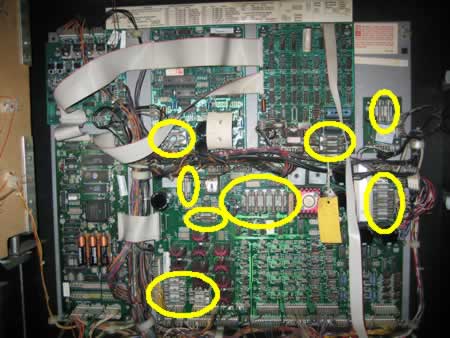
If you have a solid state (SS) game, it could be a bad connector or one that has just come loose, a connection between boards, an IC loose in its socket, bad solder joint, a blown component or just about a million other things.

It is a good time to ask, "What are my capabilities?" I have seen many fine machines ruined because owners tried to do what they were not capable of doing. At this point, it may be time to do more detailed research at PinballHQ.com, contact a repair facility, or find a very good, competent friend.

Contact Information

Comments and suggestions are appreciated. Email me at
Please let me know of any inaccuracies, updated information, etc.

External Links

General Information

Mr. Pinball - Upcoming events. Classified. The site to go for current information.
Pinball News.com - Lots of news.

Additional Repair Information

PinballHQ.com - Clay's guides, also referred to as "Marvin". By far the most complete site for repair and restoration information. Pinball owners thank their lucky stars for this site. Much of this information is highly technical and you really have to know your stuff, or just don't do it.
Tom Arnold's Tips - Great not so common sense tips for pinball machine owners.
Star Tech Journal - Information for the professionals.
Flippers - Pinball basics, articles and information for everyone. Also contains information about pinball in Europe.
Mr. Pinball Repair Tip Archive - Lots of useful information.
Fuses - Information on the different types of fuses in a pinball machine.

Specialized Repair Information

How Flippers Work - A comprehensive explanation from Steve Kulpa.
Coil Cross Reference - Information about pinball coils from Pinball Medic
Chip Cross Reference - Maybe find a replacement for that obsolete part.
Reproduce Playfield Plastics - How you can make your own playfield replacements.
Make your Own Playfield Plastics - A second "how to" article.
Playfield Parts Scans - As of May 2010, site taken down due to legal harassment.
Bill Davis - Pinball Playfield Restoration and Clear Coating. (Unfortunately, it looks like the site is shut down - will see.)
Michel Oversteyns - pinball playfield restoration. Very nicely done.
Ed Cheung - Step by step restoration. Included making and applying spot playfield overlays
Mylar removal - Remove that yellowed damage mylar without damage.
Mylar removal - Read this one, too.
Flippers.com - Backglass and playfield restoration information.
Mike Minchew - Playfield restoration information.
Bryan Kelly's Pinball Photos - Great step by step restoration photos.
Mark's Guide to Williams System 3 to System 7 SS board repair.
Playfield Overlay - How to install a playfield overlay.
How not to do a playfield overlay - Clear coat ruined an overlay
Gottlieb System 80 CPU Testing - Information specific to testing Gottlieb CPU board.
Pinball Links - Another link to other pinball links. Listing of owners and those who can help with specific games.
Chuck's Arcade - Tips on cleaning and flame polishing ramps. One page about swapping a playfield out.
Coil Resistance Info - Information on resistance values for pinball coils.
Flame Polishing Ramps - How to remove that worn look on plastic ramps.
The Teardown - Step by step pictures on repairing pinball machines
PinballResources.info - Pinball Tear-down Pictures - Upload Your Photos
How to remove plastic playfield inserts - You Tube Video

Parts Suppliers

Steve Young's Pinball Resource - Supplies for most machines and most parts. Licensed for Gottlieb reproduction parts.
Marco Specialties - Supplies for most machines and most parts. A great website for parts shopping.
Mayfair Amusements - Supplies for most machines and most parts.
Bay Area Amusements - Parts for pinball machines, ramps, etc.
Action Pinball - Supplies for machines.
HappControls - A supplier of pinball parts. Sometimes have hard to find parts.
Spare Parts Australia - Hard to find parts. Ship around the world.
K's Arcade Net - Claims to be "The Largest selection of new and reconditioned pinball boards and electronic parts."

Circuit Board Parts

Great Plains Electronics - The most comprehensive and lowest priced electronics supplier. Parts for circuit boards.
Mouser Electronics - Complete catalog for circuit board parts.
Global Sources - Replace those hard to find axial capacitors.
Action Pinball - ROM chips for SS games.

Specialized Parts

Cliffy Protectors - Playfield protectors that cover up existing damage.
Kerry's Protectors - Playfield protectors. Useful in newer playfields before they are damaged.
Pinball Inc. - Pinball ramps and decals.
WPC Security Chips - Chips needed to run some later Williams games.
Pinball Universe - Game specific parts, replacement circuit boards for Solid State (SS) games and more.
For Amusement Only - Game specific parts and reproductions.
Rottendog Amusements - New and reproduced SS circuit boards.
Betson - Service parts.
The Real Bob Roberts - Can't find it? He might have it.
Big Daddy - Hard to find parts.
Pinball Pal - Gottlieb System 1 and 80 score window color filter replacement.
Flipper Fan - Some parts and repair tips.
Machine Manuals - Download some machine manuals and circuit diagrams.
Phoenix Arcade - Cabinet artwork and playfield plastics.
Treasure Cove - Cabinet artwork.
Arcade Shop - Side graphics overlays.
Arcade Overlays - Supplies replacement overlays and side art.
The Decal Factory - Make your own decals.
McGonigal Decals - Overlay supplies.
BelDecal - Overlay supplies.
Decal Paper.com - Decal supplies.
Classic Playfield Reproductions - Reproduction of playfields and plastic sets.

LED Replacement Bulbs - Make the game extra bright and easier on the circuitry

BC's Pinball Amusements - Specializing in kits for specific games, but single bulbs also available.
Pinball Life - Great supply of 3 LED bulbs for extra brightness.
CoinTaker.com - Great prices for single LED's.

Playfield Specific

House of Payne - Protect the playfield plastics from being broken and more.
Decorator Supply - Protect the playfield plastics from being broken.

Game Information

Internet Pinball Database - Complete and extremely useful.
Game Archive - An amazing collection of machine information, sounds and more.
Mr. Pinball Price Guide - What the going rate is to purchase a machine.

Get Your Machine Repaired

Fabulous Fantasies - CA located to get your machine repaired.
Pinball Medic
Lock When Lit - Repair and circuit board repair.
Coin-op Cauldron - Circuit board repair.

Where to Play - Collections, Museums and more!

Pinball Hall of Fame - Las Vegas, NV
K&K Amusement - Kalamazoo, MI
Pinball Parlour - NW of Philadelphia, PA
Pacific Pinball Museum - San Francisco (Alameda), CA
Lyons Classic Pinball / Video - Lyons, CO
Ground Control Classic Arcade - downtown Portland, OR
Portland Pinball Map - Where to play pinball in Portland, OR
Pinball Madness - Where to play pinball in the Twin Cities, MN

Pinball Conventions

Pinball Expo - Chicago, IL late October. Granddaddy of them all.
AMOA - Las Vegas, NV - late September.
Pinball Wizards - Allentown, PA early May. Gets bigger every year.
Texas Pinball Convention - Grapevine, TX - early March
White Rose Gameroom Show - York, PA - mid-October.
Pinball at the Zoo - Kalamazoo, MI - mid April.
Amusement Showcase - location varies. Late March.
Rochester Game Room Expo - Rochester, NY - Late March.
Ohio Pinball & Gameroom Festival - Akron, OH - Early March
Midwest Gaming Classic - Oconomowoc, WI - Late March
NW Pinball and Gameroom Show - Seattle, WA - Early June
Pacific Pinball Exposition - San Francisco - Early October
Kansas City Pinball and Arcade Show - Kansas City - Late September

Other External links

Machine information

Solid State Pinball Database and a World Pinball Top 100
PinballNews.com Current and late breaking news in the pinball machine world. Covers pinball machine conventions, shows and happenings around the world
Pinball.org Rule sheets for most modern titles
Popbumper.com featuring Rob Craig, pinball columnist for Gameroom Magazine
Articles about pinball. Includes photographs of pinball machines and pinball flyers.
ArcadeHistory an alternative Pinballs database.
Library of promotion flyers for pinball machines.
Pinball Instruction & Score Cards Replace the worn out instruction and price cards in your machine with these free versions. Many machines have custom cards for download.
47 Things You Need to Know About Your Pinball Machine - Good info. Some controversial. Use slightly abrasive Novus #2? Not according to here
Pinpedia - Recent prices on auctions. Difficult to use since varied condition of the pins leads to wide variation in prices, but better than nothing .

Collections

Pinball Owners Browse private pinball collections from all around the world.
Penny arcade Impressive private collection of coin-operated mechanical games, including pinballs.

Pinball clubs

International Flippers Pinball Association (IFPA)
Professional/Amateur Pinball Association
Ithaca Pinball Club (NY)
Free State Pinball Association (MD,VA)
Steel City Pinball Association (PA)
Bay Area Pinball Association (CA)
Swedish Pinball Association (SE)
Stockholm Pinball (SE)
West Coast Pinball (SE)
Dutch Pinball Association (NL)
German Pinball Association (DE)
Brazilian Pinball Club (São Paulo and Rio de Janeiro)
Tokyo Pinball Organization (JAPAN)
Italian Pinball Association (ITALY)
Vancouver Regional Pinball Association (Canada)
Toronto Pinball League (Canada)
Portland OR Pinball

Pinball companies

Stern Pinball, Inc. World's last remaining manufacturer of commercial pinball machines. Located just outside Chicago, IL
How new machines are designed, from Pat Lawlor Design
Illinois Pinball Company. The company that purchased the rights for Bally and Williams parts and games.

Online Communities

Rec.Games.Pinball the oldest and most active pinball discussion group on the Internet, also available via newsgroups distributed via NNTP
Pinball Post Online Pinball and Gameroom Discussion Forums
Pinball Galaxy Pinball discussion forums, classifieds, pinball locator, home of the Sunday night pinball chat.
Google Maps - A map of owners of pinball machines.
Frappr Maps - Another map of owners of pinball machines.
Portland Pinball - Portland area pinball.

Other information

Pinballrankings.com Official rankings system of pinball players throughout the world
The Ring Of Pinball WebRing dedicated to showcasing major pinball websites worldwide.
Pinpedia - Pinball Auction Results A large list of the completed price of many pinball auctions
Pinball Locator Find pinball machines to play in your local community
PinGame Journal The pinball hobby publication "covering the world of pinball."
Talk Pinball A webcast (internet radio show) where enthusiasts can call in and talk to designers, manufacturers, collectors, and more.

Visitors since 2006 medical supplies

This is a personal homepage and doesn't represent the opinions of my employer, family members, friends, or anyone else.